Plain SMS has served businesses for decades, but it is limited to 160 characters of text. RCS messaging brings images, buttons, carousels and a verified brand name to the default messages app on Android phones – without the customer installing anything. This guide explains what RCS is, its features and benefits, how it compares with SMS and WhatsApp, and how businesses in India can start using it.
What is RCS messaging?
RCS stands for Rich Communication Services. It is the modern upgrade of SMS, built into the default messaging app on most Android phones (Google Messages). For businesses, RCS Business Messaging (RBM) lets brands send app-like messages – with logos, pictures, videos and action buttons – straight to the customer's inbox, from a verified sender.
Key features of RCS
- Verified sender – your brand name, logo and a verification badge appear on top of the chat, which builds trust and reduces fraud.
- Rich cards – an image or video with a title, description and buttons in one message.
- Carousels – several cards side by side that customers can swipe, ideal for products or offers.
- Suggested replies and actions – buttons to reply, call, open a website, view a location or add an event to the calendar.
- Longer messages – no 160-character limit like SMS.
- Read receipts – know when the message was delivered and read.
Benefits of RCS for businesses
- Higher engagement – visual messages with buttons get more clicks than plain text links.
- More trust – the verified brand profile shows customers the message is genuine.
- No app download – messages arrive in the phone's default messages app.
- Better tracking – delivery, read and click reports help you measure campaigns.
- SMS fallback – if a phone does not support RCS, the message can be sent as normal SMS so no customer is missed.
RCS vs SMS vs WhatsApp
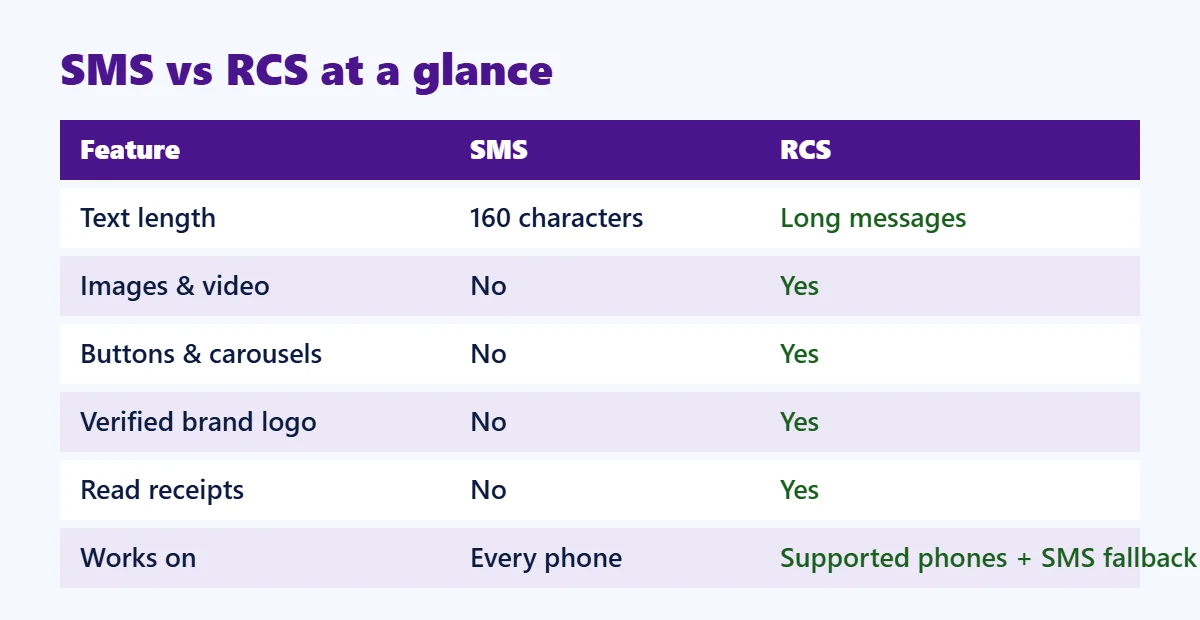
RCS vs SMS
SMS works on every phone but supports only plain text and links. RCS adds images, buttons, carousels, a verified brand and read receipts, but works only on supported phones (mainly Android) – which is why SMS fallback is important.
RCS vs WhatsApp
Both support rich media and buttons. WhatsApp Business API requires the customer to use WhatsApp and follows Meta's template rules and pricing. RCS works inside the phone's built-in messages app and reaches Android users who may not have saved your number or opted into WhatsApp. Many brands use both channels for maximum reach.
Popular RCS use cases
- E-commerce – product carousels, offers with "Shop now" buttons, order and delivery updates
- Banking and finance – verified alerts, loan and card offers, payment reminders
- Travel – booking confirmations, boarding updates, hotel offers
- Education – admission campaigns with course cards and "Call counsellor" buttons
- Real estate – property images with "Book site visit" and location buttons
- Healthcare – appointment reminders with "Confirm" and "Reschedule" buttons
How to start RCS messaging in India
- Create your brand profile – business name, logo, banner image, description, website and contact details.
- Get your RCS agent verified – the brand is checked before launch to make sure it is genuine.
- Design your messages – rich cards, carousels and buttons for each campaign.
- Upload your audience – send to opted-in customers and enable SMS fallback for non-RCS phones.
- Track and improve – use delivery, read and click reports to optimise.
A messaging partner like Digital SMS 4 U handles brand registration, verification and the technical setup so you can focus on the campaign.
Best practices for RCS campaigns
- Use clear, high-quality images that look good on small screens.
- Keep one main action per card, such as "Shop now" or "Book now".
- Personalise the message with the customer's name or last purchase.
- Send only to customers who expect to hear from you, and allow easy opt-out.
- Test on a few phones before sending to your full list.
- Always keep SMS as the fallback channel.
Get started with Digital SMS 4 U
Digital SMS 4 U offers RCS Business Messaging along with bulk SMS, WhatsApp Business API and email from one account, with help for brand verification and campaign design. Contact us for a free demo.
Frequently asked questions
Does RCS work on iPhone?
RCS is widely supported on Android through Google Messages. Support on other devices depends on the phone, software version and operator, so always enable SMS fallback.
Do customers need to install an app for RCS?
No. RCS messages arrive in the phone's default messages app.
Is RCS more expensive than SMS?
RCS messages usually cost more than a plain SMS, but rich content and buttons often bring much higher engagement, which can lower the cost per click or sale.
Is DLT registration needed for RCS?
RCS has its own brand verification process. If you use SMS fallback, the fallback SMS must follow normal DLT rules.