If you want to send bulk SMS, OTPs or alerts to Indian mobile numbers, DLT registration is mandatory. Without it, operators simply drop your messages – no error, no delivery. This guide explains, in plain language, what DLT is, who needs it, the documents you need and the exact DLT registration process to get your entity, sender ID (header) and message templates approved.
At Digital SMS 4 U we help businesses finish DLT registration every week, so the steps below are based on what actually works on the operator portals.
What is DLT registration?
DLT stands for Distributed Ledger Technology. Under TRAI's Telecom Commercial Communications Customer Preference Regulations (TCCCPR), 2018, every business that sends commercial SMS in India must register on a DLT platform run by a telecom operator. The platform records three things on a shared ledger:
- Who is sending – your business (called the Principal Entity, PE)
- The name customers see – your sender ID, called the header (for example DSFORU)
- What you are allowed to send – pre-approved message templates
When you send an SMS, the operator checks it against this record. If the header, template or sending chain does not match, the message is blocked. This is how TRAI controls spam and fraud SMS.
Who needs DLT registration for bulk SMS?
Any business, institution or individual that sends SMS for business purposes needs it, for example:
- Shops, e-commerce stores and restaurants sending order and delivery updates
- Schools, coaching classes and colleges sending fee reminders and notices
- Hospitals, clinics and labs sending appointment and report alerts
- Apps and websites sending OTPs for login and verification
- Real estate, finance and insurance companies sending offers to customers
Personal SMS from your own phone do not need DLT. Bulk SMS sent through any SMS gateway or API do.
Documents required for DLT registration
Keep clear scanned copies (PDF or JPG) ready before you start:
- PAN card of the business (or of the proprietor for a sole proprietorship)
- GST certificate or another business proof such as Udyam/MSME certificate, Shop Act licence or incorporation certificate
- ID proof of the authorised person (PAN / Aadhaar)
- Authorisation letter on the company letterhead, signed and stamped (most portals provide a format)
- An official email ID and mobile number for OTP verification
Tip: the business name you enter must match your PAN/GST exactly. A mismatch is the most common reason for rejection.
DLT registration process: step by step
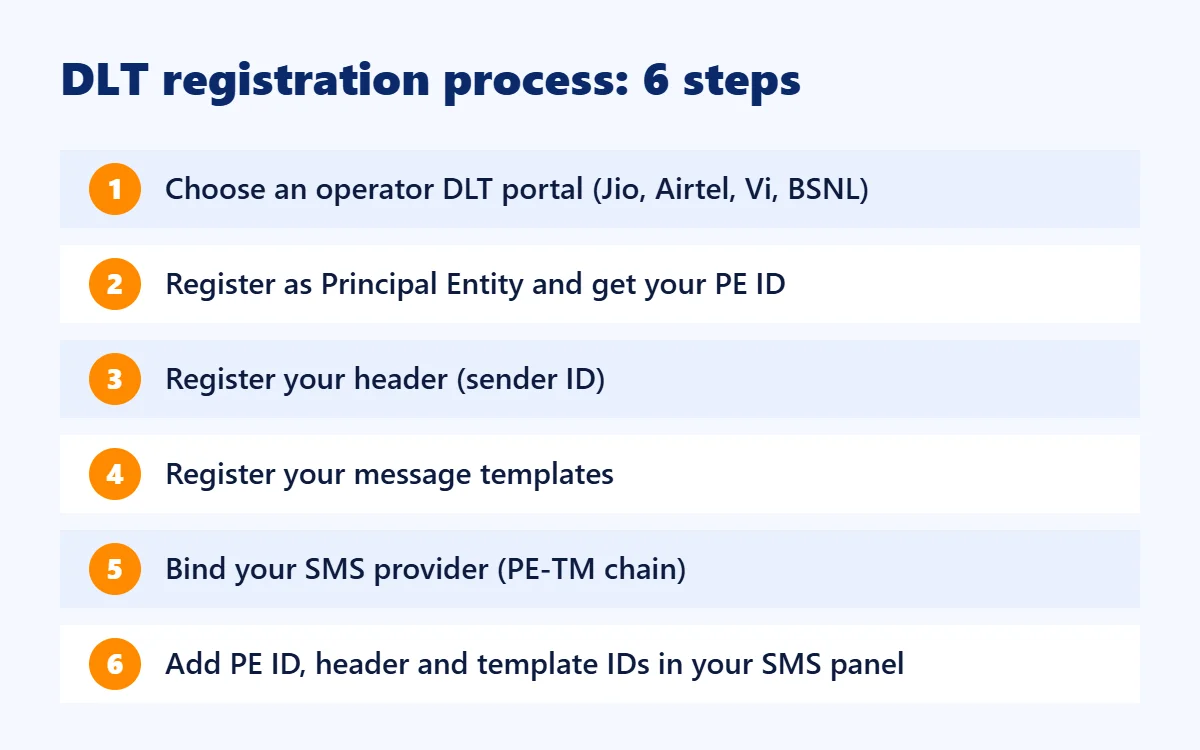
Step 1: Choose an operator DLT portal
You register only once, on any one operator's portal – Jio, Airtel, Vodafone Idea (Vi), BSNL and others run their own. Your registration is shared with the other operators through the ledger. Pick the portal you find easiest; the process is similar everywhere.
Step 2: Register as a Principal Entity (PE)
Choose the Enterprise / Principal Entity option (not Telemarketer), fill in your business details, upload the documents and pay the one-time registration fee shown on the portal. After verification – usually within a few working days – you receive your PE ID (Entity ID). Save it; you will need it with every SMS provider.
Step 3: Register your header (sender ID)
The header is the name shown in place of a phone number when the SMS arrives.
- For transactional and service SMS it is usually 6 letters that clearly relate to your brand, for example DSFORU for Digital SMS 4 U.
- Promotional SMS use a numeric header issued for promotions.
- Generic words (like INFO or ALERTS) and other companies' brand names are rejected.
Operators now also show the category of the message with a suffix such as -T (transactional), -S (service), -P (promotional) or -G (government), so customers can see at a glance what kind of SMS they received.
Step 4: DLT template registration
Every SMS you send must match a template approved on DLT. You write the fixed text once and mark the changing parts as variables. Example of a transactional template:
Dear {#var#}, your order {#var#} has been shipped and will reach you by {#var#}. - Digital SMS 4 U
Good practices that get templates approved faster:
- Include your brand name in the text.
- Choose the correct category: Transactional (OTPs, bank alerts), Service (updates and reminders to existing customers) or Promotional (offers and marketing).
- Keep the fixed text meaningful – a template that is only variables is rejected.
- Do not put links or phone numbers inside variables. URLs, app links and call-back numbers must be whitelisted on the portal and written in the template.
- Do not use public link shorteners; use your own domain.
Step 5: Link your SMS provider (PE–TM binding)
Next, connect your PE ID to the telemarketer (TM) ID of the SMS company that will deliver your messages. On the portal this is called the telemarketer chain or PE–TM binding. Your provider accepts the request and the chain becomes active. Messages sent through a provider that is not in your chain are blocked.
Step 6: Add the IDs in your SMS panel
In your SMS panel, enter your PE ID, header and the template ID of each approved template. From now on every SMS is matched automatically and delivered.
How long does DLT registration take?
- Entity (PE) approval: usually 1–3 working days if documents are correct
- Header approval: usually 1–3 working days
- Template approval: often within 24–72 hours
So a business that keeps its documents ready can normally start sending SMS within about a week.
Common reasons for DLT rejection
- Business name does not match PAN/GST
- Unclear, cropped or expired documents
- Header that does not relate to your brand, or a generic word
- Template without brand name, or with only variables
- Promotional content submitted as a transactional template
- Links or numbers that are not whitelisted
Rules to follow after DLT registration
- Send promotional SMS only within the permitted daytime window and not to numbers on the DND list without the customer's consent.
- Always give customers an easy way to opt out of promotional messages.
- Keep using the exact approved template text – even a small change can block the message.
- Headers that are not used for a long time may be deactivated, so keep them active or renew them when needed.
Need help with DLT registration?
DLT can feel confusing the first time. Our team can guide you through entity registration, choose a header that gets approved, write compliant templates and connect everything to your account, so you can start sending SMS quickly. See our DLT registration service, explore bulk SMS and OTP SMS, check pricing or contact us for free help.
Frequently asked questions
Is DLT registration mandatory for bulk SMS in India?
Yes. Under TRAI rules, commercial SMS from an unregistered entity, header or template are blocked by the operators.
Do I need to register on every operator's portal?
No. Registering once on any one DLT portal is enough; the details are shared with other operators.
Can a sole proprietor or small shop do DLT registration?
Yes. A proprietor can register using business proof such as GST or Udyam certificate along with the proprietor's PAN.
Can I change a template after approval?
You cannot edit an approved template. Register a new template with the changed text and use its new template ID.
Is DLT needed for WhatsApp or email?
No. DLT applies to SMS only. WhatsApp Business API messages follow Meta's template approval instead, and email has its own rules.