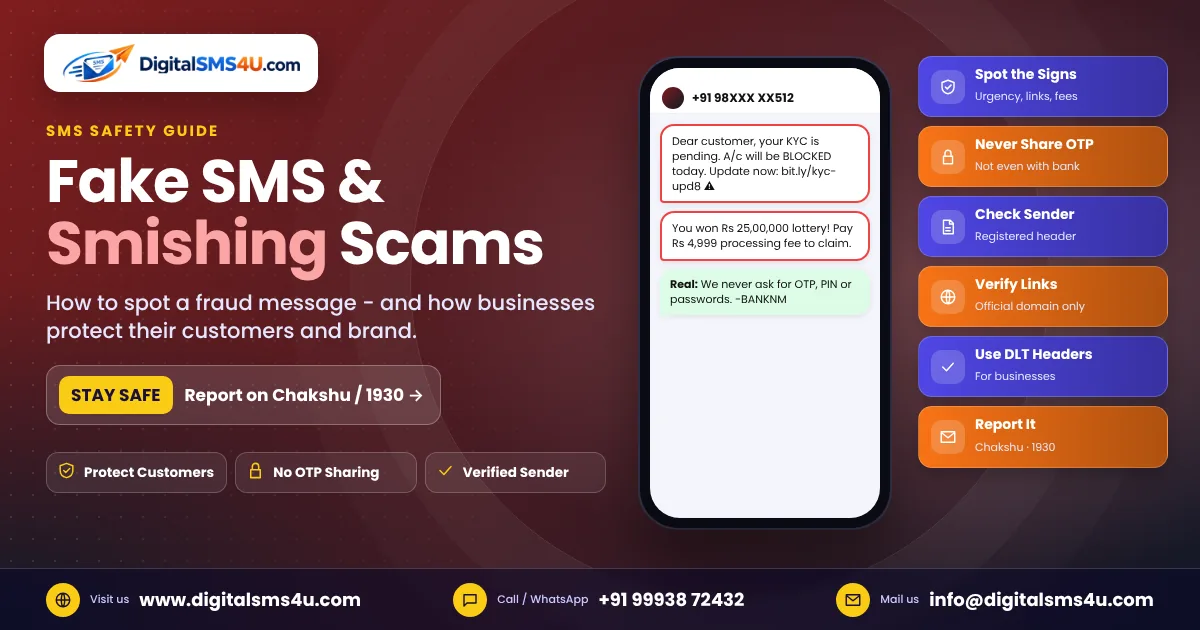
"Your KYC is pending, your account will be blocked today." "You have won a lottery of Rs 25 lakh." "Your electricity will be cut tonight – call this number." Almost everyone in India has received messages like these. They are fake SMS, and the trick behind them is called smishing (SMS + phishing). In this guide we explain how smishing works, how to spot a fraud message in seconds, what to do if you have clicked a link, and how businesses can protect their customers and their own brand name.
What is smishing?
Smishing is a fraud in which criminals send text messages that look like they come from a bank, courier company, electricity board, government office or a well-known brand. The goal is to make you click a link, call a number, install an app or share an OTP, PIN or card details. Once they have that information, they can take money from your account or misuse your identity.
Common fake SMS you may receive
- KYC / account block: "Your bank account / SIM / wallet will be blocked. Update KYC now: short link."
- Electricity bill: "Your power will be disconnected tonight. Call the officer on this mobile number."
- Lottery or prize: "You won a car / Rs 25 lakh. Pay a small processing fee to claim."
- Courier and parcel: "Your parcel is on hold due to an incomplete address. Pay Rs 25 to redeliver."
- Job and part-time work: "Earn Rs 5,000 daily by liking videos. Message on WhatsApp."
- Refund or reward points: "Your reward points expire today. Redeem now and enter your card details."
- Fake OTP request: "We sent an OTP by mistake, please forward it to us."
7 signs that an SMS is fake
- Urgency or fear – "today", "within 2 hours", "account blocked", "legal action". Real companies rarely threaten you by SMS.
- It comes from a normal 10-digit mobile number. Genuine business SMS in India are sent from a registered sender ID (header) such as AX-BANKNM or JD-BRANDX, not from a personal number.
- Unknown or shortened links – check the domain carefully. A bank link will be on the bank's own website, not on a random short link or a misspelt domain.
- They ask for OTP, PIN, CVV or passwords. No bank, company or government office will ever ask for these.
- "Pay a small fee to receive a big prize" – a classic sign of fraud.
- Spelling and grammar mistakes, odd capital letters and strange formatting.
- A request to install an app (screen-sharing or "support" apps) or to call a mobile number instead of the official customer care number.
What to do if you receive a suspicious SMS
- Do not click the link, call the number or reply to the message.
- Verify directly with the company using the number or website you already know – not the one in the SMS.
- Report the message on the government's Sanchar Saathi portal using the Chakshu facility, and report unwanted commercial messages to your mobile operator (for example by sending it to 1909 or through the operator's DND app).
- Block the number and delete the message.
Already clicked or shared details? Act fast
- Call your bank immediately and block your card, UPI or net-banking access.
- Call the national cyber-crime helpline 1930 or file a complaint at cybercrime.gov.in – reporting quickly gives the best chance of stopping the money.
- Change the passwords of your email, banking and social media accounts, and turn on two-step verification.
- Uninstall any app you installed because of the message.
How businesses can protect their customers (and their brand)
Fraudsters love to copy well-known brands. If your customers cannot tell your real messages from fake ones, your brand loses trust. A professional SMS setup makes your messages easy to recognise:
- Always send from your registered DLT header. Tell customers your official sender ID (for example on your website and invoices) and that you never message from personal numbers.
- Use your own domain for links and whitelist them in your DLT templates. Avoid random public short links.
- Add a safety line to OTP and payment messages: "Do not share this OTP with anyone. BRAND never asks for your OTP or PIN."
- Use RCS verified sender – on Android phones, RCS shows your brand name, logo and a verification badge, which fake messages cannot copy.
- Use the WhatsApp Business API with your verified business profile, so customers see your official name.
- Keep templates consistent. When every message from you looks the same, customers notice quickly when something is different.
- Educate customers with an occasional awareness SMS: "BRAND will never ask for your OTP, PIN or password. Report suspicious messages on 1930."
How DLT helps stop SMS fraud
India's DLT (Distributed Ledger Technology) system, set up under TRAI rules, requires every business sender to register its entity, sender ID (header) and message templates with the telecom operators. Messages that do not match a registered header and template are blocked. This makes it much harder for fraudsters to send messages that look like they come from your company, and it lets operators trace who sent a commercial message. That is why using a DLT-registered provider is both a legal requirement and a strong protection for your brand.
Frequently asked questions
Can a fake SMS come from a real-looking sender ID?
Fraudsters try to use names that look similar, but registered headers are controlled through DLT. If you are in doubt, do not click – check the message with the company's official customer care.
Is it safe to click a link if the message has my name?
Not always. Fraudsters sometimes have leaked names and numbers. Judge the message by the signs above, not by whether it knows your name.
Where do I report SMS fraud in India?
Use the Chakshu facility on the Sanchar Saathi portal for suspected fraud messages, and call 1930 or visit cybercrime.gov.in if you have lost money.
Want customers to trust every message you send? DigitalSMS4U helps you send from a DLT-registered header, verified RCS and the official WhatsApp Business API. Talk to our team to set it up.